multi-format rendering in kdenlive
· 8 min read · sok · kdenlive · c++ · mlt

i'm ajay chauhan (matrix: hisir:matrix.org). adding multi-format rendering to kdenlive was my season of kde '24 project — and my first real contribution to kde.
i first ran into kde while distro-hopping — ubuntu gnome, then arch, finally kde neon to get the latest plasma features. it was occasionally buggy, but i enjoyed plasma enough that i've stuck with it for over two years now. i'd also written gui apps in c++ with qt for school projects, so season of kde was a chance to get properly acquainted with kde development.
kdenlive is a free and open-source video editor built on the mlt framework — the name is short for kde non-linear video editor — and it runs on gnu/linux, windows, bsd, and macos. it has always been my go-to for editing, from college presentations to small projects.
my project: add multi-format rendering (horizontal / vertical / square) to kdenlive, so a video can be exported in different aspect ratios for different platforms and use cases — social-media stories, square instagram posts, and so on. my mentors were julius künzel and jean-baptiste mardelle.
the key tasks
- add code to apply filters to the clips in the main tractor to achieve the desired aspect ratio
- modify the export ui so the user can select an aspect ratio, and invoke that filter when they choose one
- make sure the selected aspect ratio is integrated into the final rendering profile
working out the crop
first i did the math on getting the aspect ratio right. the core is a calculateCropParameters function that calculates the correct cropping given source and destination aspect ratios — whether to crop the sides (for a wider target) or the top and bottom (for a taller one):
calculateCropParameters(sourceAspectRatio, targetAspectRatio, ...) {
  if (sourceAspectRatio differs from target) {
    if (source wider than target) {
       // crop sides
    } else {
       // crop top and bottom
    }
  } else {
    // no crop needed
  }
}
the first step is extracting the source video properties — its width, height, and display aspect ratio (DAR):
int sourceWidth = pCore->getCurrentProfile()->width();
int sourceHeight = pCore->getCurrentProfile()->height();
double sourceAspectRatio = pCore->getCurrentProfile()->dar();
pCore->getCurrentProfile() is the key call here — it gives access to the current profile, including the DAR, which is the width-to-height ratio of the video as displayed. then i apply the crop by setting up an mlt crop filter with the calculated parameters:
std::unique_ptr<Mlt::Filter> cropFilter = std::make_unique<Mlt::Filter>(pCore->getProjectProfile(), "crop");
cropFilter->set("left", leftOffset);
cropFilter->set("right", sourceWidth - cropWidth - leftOffset);
cropFilter->set("top", topOffset);
cropFilter->set("bottom", sourceHeight - cropHeight - topOffset);
merge request: implement multi-format rendering ↗. the main challenge here was configuring the producer and consumer (xmlConsumer2()) to render in the new aspect-ratio profile when generating the xml playlist — my mentor helped a lot with that.
update — april 2024
with the crop logic working, the second half was the interface and the rough edges — letting the user actually pick a ratio, and cleaning up how temporary files were handled.
temporary file handling
i'd used QTemporaryFile for cross-platform temp files, replacing hardcoded temp paths — but it created a new temporary file every time the method ran, which was inefficient. on my mentor's feedback i refactored it to create one empty QTemporaryFile object and only set it up with a specific file template when an aspect-ratio change is actually required.
the user interface
next, the controls. i added a setAspectRatio method on the RenderRequest class to store the selected aspect ratio:
void RenderRequest::setAspectRatio(const QString &aspectRatio)
{
    m_aspectRatio = aspectRatio;
}
which is then passed to the projectSceneList method in the ProjectManager class:
QString ProjectManager::projectSceneList(const QString &outputFolder, const QString &overlayData, const QString &aspectRatio)
{
    // ...
}
in the render widget i added a new row with a label and a combo box, populated in the rendering widget's constructor:
m_view.aspect_ratio_type->addItem(i18n("Default"));
m_view.aspect_ratio_type->addItem(i18n("Horizontal (16:9)"), QStringLiteral("horizontal"));
m_view.aspect_ratio_type->addItem(i18n("Vertical (9:16)"), QStringLiteral("vertical"));
m_view.aspect_ratio_type->addItem(i18n("Square (1:1)"), QStringLiteral("square"));
m_view.aspect_ratio_type->setCurrentIndex(0);
finally the selected aspect ratio is retrieved from the combo box and passed to the setAspectRatio method of the RenderRequest object:
request->setAspectRatio(m_view.aspect_ratio_type->currentData().toString());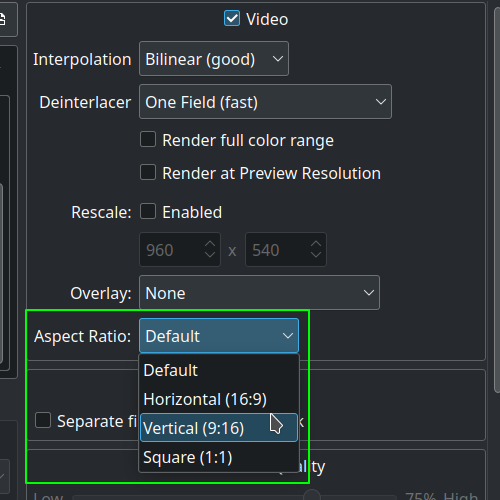
the divisible-by-2 crash
profiles whose width or height isn't a multiple of two caused crashes. i fixed it by ensuring the video profile width and height are always multiples of two.
[libx264 @ 0x733910204380] width not divisible by 2 (607x1080)
i went looking for why the dimensions need to be even in the first place, and it comes down to chroma subsampling:
as required by x264, the 'divisible by 2 for width and height' is needed for yuv 4:2:0 chroma subsampled outputs. 4:2:2 would need 'divisible by 2 for width', and 4:4:4 does not have these restrictions. however, most non-ffmpeg-based players can only properly decode 4:2:0, so that is why you often see ffmpeg commands with the -pix_fmt yuv420p option when outputting h.264 video. — sourcewhat i learned
it was a real learning experience. i gained the confidence to work on and navigate a large codebase, a better grip on object-oriented programming concepts (and an honest sense of how much further i have to go), and a real appreciation for efficient resource management — handling temporary files and much more. beyond the code, i learned how to communicate better with mentors. i'm grateful to julius künzel and jean-baptiste mardelle for the guidance and support throughout — and it's what led me straight into two google summers of code with kde.